Permission model and system management
The platform uses the common "user - role - menu" permission model, with data permissions and project isolation layered on top.
Permission hierarchy
| Level | Determines |
|---|---|
| Menu permissions | Which navigation items, pages and buttons are visible, and which backend APIs can be accessed |
| Data permissions | Which APIs, data sources, groups and logs are visible |
| Project isolation | After entering a project, only data of the current project can be operated on |
| Super administrator | has all menus by default and is not limited by role menus |
Data permission scope
- APIs, data sources and groups created by the user.
- Groups authorized for collaboration, and all APIs under those groups.
- Authorized data sources (usable only; connection information is not visible).
- API logs: APIs created by the user, APIs accessed with the user's own credentials, APIs under authorized groups, and call logs of APIs without authentication.
User management
Entry: System management → User list.
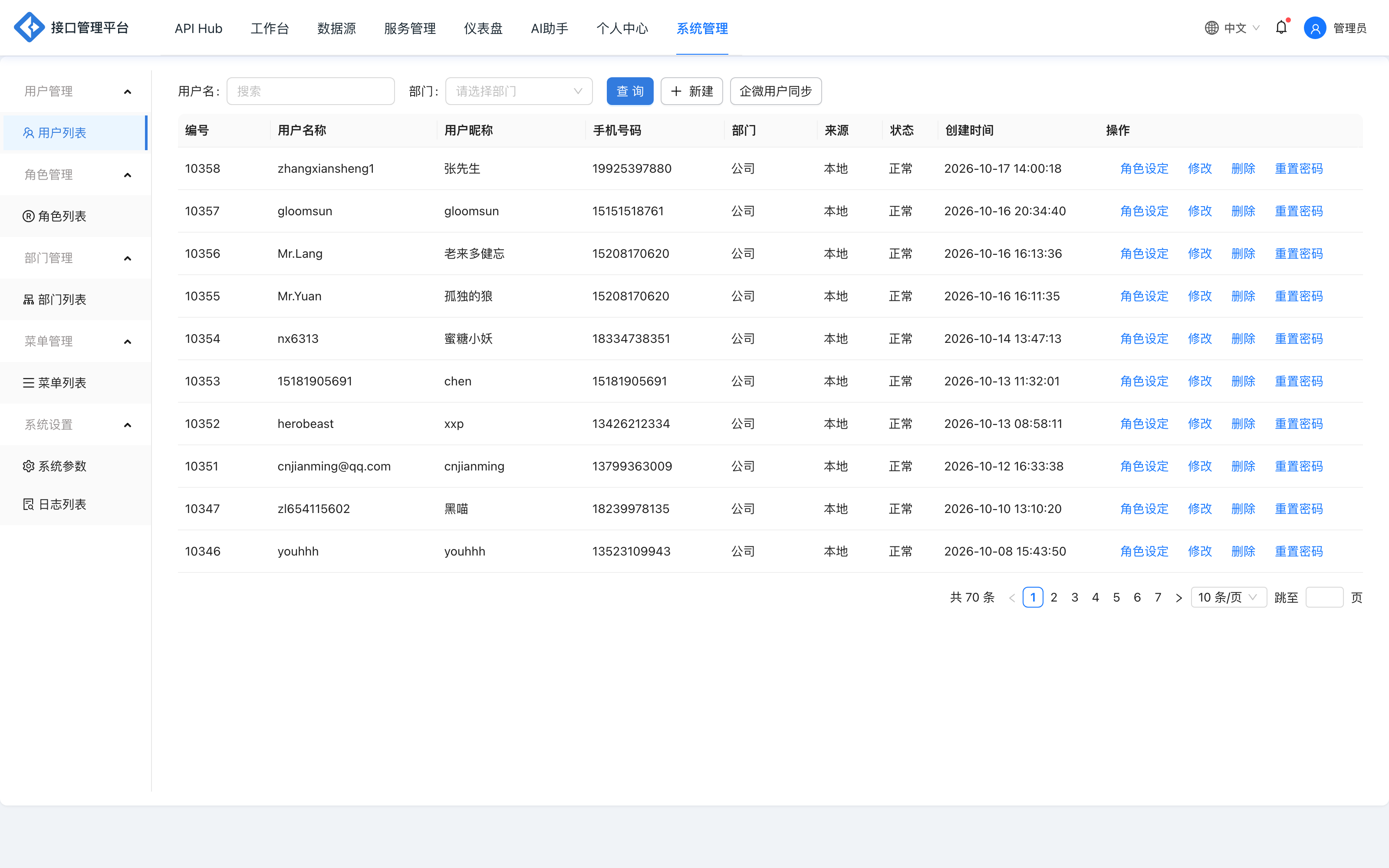
| Operation | Description |
|---|---|
| Add | Fill in account, nickname, department, position, role, remarks, etc.; position and remarks can be empty |
| Edit | Modify basic information and roles |
| Delete | Delete the user; first confirm there are no pending approvals or subscriptions |
| Reset password | The password is reset to the username by default; this sensitive operation can only be performed by the super administrator |
Rules:
- A user must be assigned a role to log in, otherwise
41003is returned. - The initial password of a new user defaults to the username; it should be changed after the first login.
- A user may come from local, WeCom, DingTalk and other sources; SSO users are linked to local accounts through bindings.
Department management
Entry: System management → Department list.
Departments, also called organizations, are used to divide users by business:
- Displayed as a tree structure, with one root node by default.
- The root node can be set to any department or organization.
- Adding, editing and deleting sub-departments is supported.
Role management
Entry: System management → Role list.
| Field/operation | Description |
|---|---|
| Role name | Display name |
| Type | Used to distinguish roles for business purposes and easier classification |
| Associated menus | Select the menus and buttons the role can access |
| Add/edit/delete | Maintain role information and the authorization scope |
When a role is not associated with any menu, users under that role cannot log in (41004). After changing a role's menus, affected users must log in again or refresh the page to see the new menus.
Menu management
Entry: System management → Menu list.
Menus are displayed as a tree; top-level menus or submenus can be added.
| Field | Description |
|---|---|
| Menu path | The route address the frontend page navigates to |
| Menu code | Unique identifier of the menu |
| Hidden | Controls whether the frontend shows the menu entry |
| Menu type | Directory (navigation) or button (page action) |
| Permission identifier | API path rules accessible under the menu, using /** to match a common prefix; separate multiple entries with semicolons ; |
| Sort | Controls the display order of menus |
| Icon | Menu icon |
The mapping between menus and backend APIs is maintained through "permission identifiers". For example, /api/box/sys/api/info/** allows access to admin APIs under that prefix. When adding pages or buttons, configure the permission identifiers as well; otherwise, even if users can see the menu, requests may fail because the APIs are not permitted.
System logs
Entry: System management → Operation logs.
Records key operations such as add, edit, delete, authorization and publishing, including:
- Operator
- Operator IP
- Operation module
- Operation content
- Operation time
Supports filtering by operator and time range, for auditing and troubleshooting. System logs and API call logs are two separate datasets: the former records admin operations, while the latter records open API calls.
System parameters
Entry: System management → System parameters.
System parameters maintain platform-level configuration as key-value pairs; fields include parameter name, parameter key, parameter value, parameter type and remarks.
| Parameter key | Purpose |
|---|---|
api_prefix | The common prefix for platform APIs; the prefix of API addresses and request addresses in the documentation comes from this parameter |
subscription.remind.days | Number of days before subscription expiration to send reminders, comma-separated; defaults to the deployment configuration crabc.subscription.remind-days when absent |
- Parameter values take effect immediately after modification and override similar defaults in deployment files.
- Adding custom parameters does not affect existing functionality.
- Modifying
api_prefixaffects API address construction; before changing it, confirm the existing callers and gateway routes.
Common error codes
| code | Meaning | Handling |
|---|---|---|
41003 | User has no role | Assign a role in user management |
41004 | Role has no menu permissions | Associate menus in role management |
41014 | User does not exist | Check whether the account has been created or deleted |
41005 | Invalid token | Log in again |
43003 | No operation permission | Check data ownership, project role and menu permissions |
Best practices
- Split roles by position; avoid granting the administrator role to all users.
- Configure both menu permissions and API permission identifiers; do not configure only page entries.
- Regularly review operation logs and accounts that have not logged in for a long time.
- Verify system parameter changes in a test environment before applying them in production.
- For external collaborators, prefer project membership + group authorization rather than promoting them directly to super administrator.
Related reading: Project space, Personal center, Alerts and logs.