Data source management
A data source is the entry point through which APIs access databases. The platform provides unified access to heterogeneous databases through a data source driver SPI and a plugin-based design, and offers metadata browsing, read-only queries, connection pool configuration and cross-project authorization.
Supported data sources
| Category | Type | Code |
|---|---|---|
| SQL | MySQL / Oracle / SQL Server / PostgreSQL | mysql, oracle, sqlserver, postgresql |
| SQL | TiDB / OpenGauss / OceanBase | tidb, opengauss, oceanbase |
| SQL | DM (Dameng) / Kingbase / TDSQL / StarRocks | dm, kingbase8, tdsql, starrocks |
| NoSQL / new types | Elasticsearch | elasticsearch |
| NoSQL / new types | TDengine / ClickHouse / DolphinDB / Hive | tdengine, clickhouse, dolphindb, hive |
Data sources such as Elasticsearch and Hive do not support full standard SQL or dynamic tags such as if; the platform performs common syntax conversions at the driver layer. When table or column names contain special characters such as -, wrap them in double quotes.
Data source list
Entry: Data Sources.
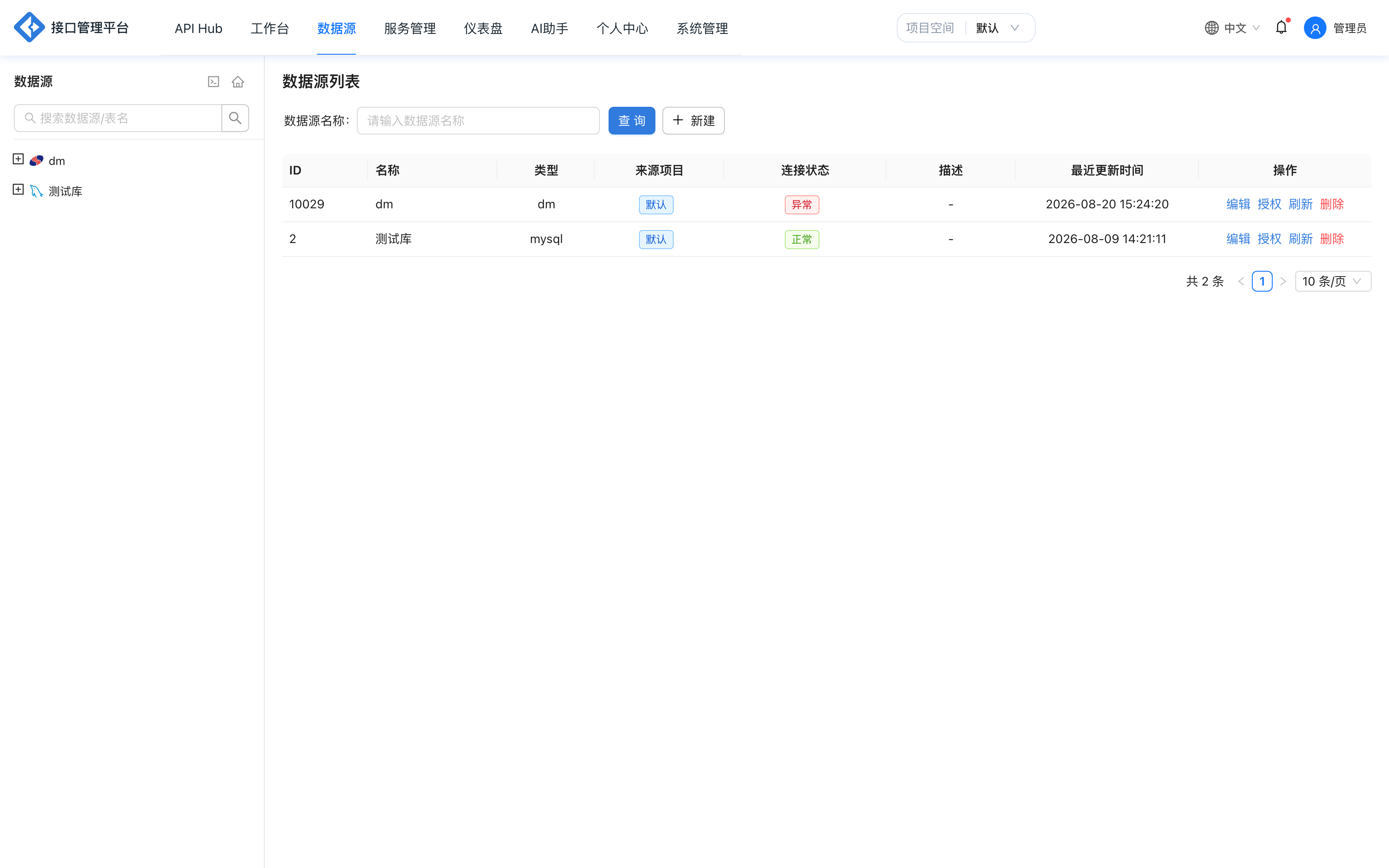
The list shows basic information and status for data sources and supports:
- Filtering by type and searching by name.
- Creating, editing and deleting data sources.
- Testing connections and enabling/disabling data sources.
- Expanding the metadata tree to browse databases, tables and columns.
- Authorizing data sources for use by other projects.
Data permissions: you can only see data sources you created and data sources you have been authorized to access.
Add a data source
- Click Create and select the data source type.
- Fill in the connection information:
| Field | Description |
|---|---|
| Data source name | Display name; we recommend including the environment or business identifier |
| Host / port | Database host and port |
| Database / schema | Default database or schema |
| Username / password | Connection account; the password is stored encrypted |
| Connection parameters | Additional JDBC parameters provided by the database type |
| Connection pool | Minimum idle connections, maximum connections, maximum lifetime, keepalive interval, etc. |
- Click Test Connection to verify network connectivity and credentials.
- After saving, the platform discovers metadata automatically.
Connection pool defaults
| Parameter | Default value |
|---|---|
| Minimum idle connections | 0 |
| Maximum connection lifetime | 15 minutes |
| Keepalive probe interval | 2 minutes |
| Maximum connections | Uses the connection pool default when left blank; forced to 1 when the data source is disabled |
| Idle connection eviction / connection creation timeout | Uses the connection pool default when left blank |
API calls reuse the connection pool. In high-concurrency scenarios, set an upper limit based on the database's maximum connection count to avoid multiple data sources saturating database connections at the same time.
Metadata browsing
After a successful save, the metadata tree on the left expands in three levels: database → table → column.
- Click a table name to open the data query page, which loads table data by default.
- View table structures, column types and comments.
- View the DDL script and copy it as a SQL template.
- Refresh metadata to detect table structure changes.
Data query
Click a table name to open the query page, which supports custom read-only SQL:
- Only statements starting with
SELECT,SHOW,DESC,DESCRIBEorEXPLAINare allowed. - Query results are displayed with pagination; a single preview returns at most 100 rows.
- SQL formatting and execution time display are supported.
Cross-project authorization
Data sources can be authorized across projects:
- Click Authorize in the data source list.
- Select the target project.
- The authorized project can select the data source in APIs.
- The authorized party can only use the data; it cannot view or modify connection information or account credentials.
Limitations:
- When a data source is referenced by APIs in other projects, you cannot revoke authorization or delete it.
- After authorization is revoked, cross-project APIs that reference the data source must be adjusted.
- Authorizations are maintained per data source and are not cleaned up automatically when a project is deleted; remove references first.
Security mechanisms
| Mechanism | Description |
|---|---|
| Password encryption | Data source passwords are stored encrypted, and APIs never return plaintext |
| Project isolation | A data source is visible only within its own project by default |
| Read-only queries | The metadata query page is restricted to read-only statements |
| Permission checks | Users other than the creator must be authorized to access |
| Connection test | Verifies connectivity before saving to reduce invalid configurations |
Delete and disable
- A data source referenced by APIs cannot be deleted directly.
- After a data source is disabled, the connection pool maximum connection count is forced to 1, and related APIs cannot query normally.
- Before deleting, make sure that no in-development or released APIs reference the data source.
Extend with new types
Adding a data source type requires implementing the DataSourceDriver interface and registering it as a plugin:
public interface DataSourceDriver {
    String type();
    DataSource getDataSource(DataSourceConfig config);
    // ...
}
The driver interface is defined in apigo-db-spi, and the generic JDBC implementation is in apigo-plugin. See Extension capabilities.
Related reading: Metadata and data query, SQL mode, Data model.