Workbench overview
The Workbench is the main entry point for API development. It integrates API groups, four development modes, online testing, save and release, and recently viewed items.
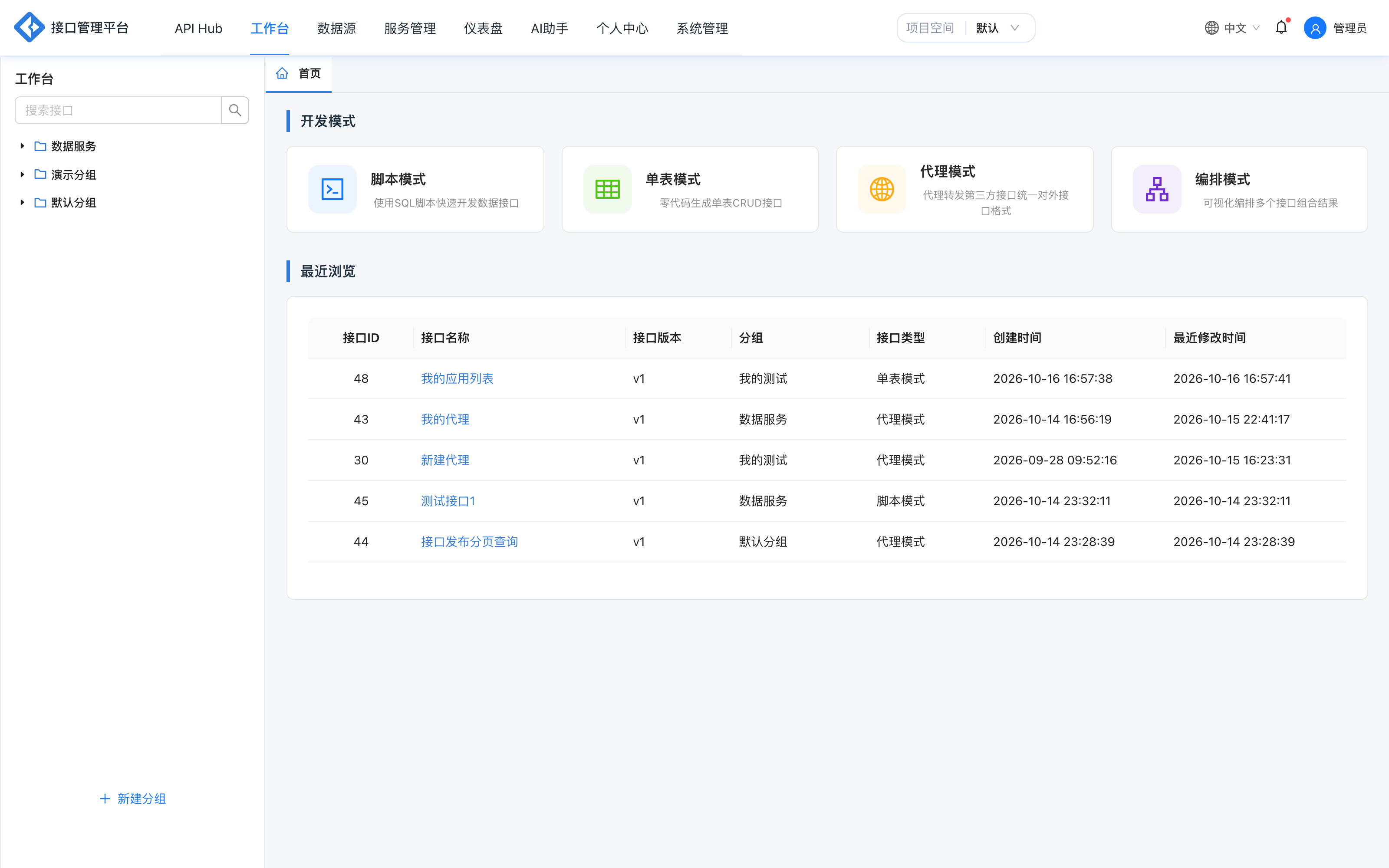
Page layout
| Area | Content |
|---|---|
| Left group tree | Search APIs, view groups and subgroups, create groups and edit groups |
| Top tabs | Home page and opened API edit pages; tabs can be closed and switched |
| Home page | Entries to the four development modes + recently viewed |
| Edit page | Development mode panel on the left, canvas/editor in the middle, properties panel on the right |
Four development modes
| Mode | Entry | Best for | See also |
|---|---|---|---|
| Script mode | Use SQL scripts to quickly develop data APIs | Dynamic SQL, batch operations and stored procedures | SQL mode |
| Table mode | Generate single-table CRUD APIs with zero code | Standard single-table queries | Table mode |
| Proxy mode | Proxy and forward third-party APIs | Wrapping external HTTP services | Proxy mode |
| Orchestration mode | Visually orchestrate multiple APIs and combine results | Multi-API aggregation and data processing | Orchestration mode |
Mode switching
After an API is created, avoid switching its execution mode arbitrarily. Different modes have different configuration structures, and switching may lose SQL, proxy parameters or orchestration rules.
API groups
The group tree on the left manages APIs hierarchically:
- Groups can contain nested subgroups.
- Non-administrators can only see groups they created and groups they are authorized for.
- When creating a group, you can set the group name, parent group and authorization invitations.
- After you enter a specific username in an authorization invitation, that user can view APIs under the group.
- A group or API can be deleted only when the group is empty or the API is not released.
Groups and Service Management → Group Categories use the same group data; category management is independent and available to all users.
Recently viewed
The bottom of the home page shows recently edited and released APIs:
| Column | Description |
|---|---|
| API ID | Unique API identifier |
| API name | Click to open the edit page |
| API version | Current version number |
| Group | Owning group |
| API type | Script / table / proxy / orchestration |
| Created at | First creation time |
| Last modified | Most recent save or release |
Click a row to return to the API edit page quickly.
Save and release
- Save: saves the current API definition to MySQL and creates or updates development-state data.
- Test: verifies request parameters and responses online.
- Release: select a target environment and generate a release snapshot for that environment.
- Go live: after release, the API becomes callable; only APIs that are public + in the production environment + live appear in the API Hub.
Limitations:
- New APIs must be saved first; otherwise the release button is disabled.
- Live APIs cannot be edited directly and must be taken offline first (
43002). - Releasing an orchestration API without orchestration rules configured is blocked (
41013). - API paths must be unique within the same environment; conflicts return
41006.
Edit page right panel
The right panel usually contains:
| Panel | Content |
|---|---|
| Basic information | Name, path, method, permission level, authentication method, protocol, group, category, timeout, transaction, version |
| Request parameters | Parameter name, type, location, required, example, description, validation, pagination |
| Response parameters | Field name, mapped field, source parameter name, type, description |
| Data plugins | Filtering, formatting, field merging, field renaming, result transformation (orchestration mode does not include this panel) |
| Mock / test cases | Simulated responses and regression cases |
Development recommendations
- Validate SQL on a small data set before releasing to production.
- Enable transactions for write operations and define parameter validation explicitly.
- Prefer signature authentication for external APIs; avoid using no authentication.
- Configure test cases for APIs and run regression before release.
- Use groups + collaboration authorization to control visibility instead of sharing accounts.