API list
"Service management → API list" centrally manages all APIs in the current project. The page has two tabs:
| Tab | Content |
|---|---|
| In development | API sources that are not yet released and are still being edited |
| Released | Release snapshots currently effective in each environment; can be taken online/offline, synced, rolled back and exported |
In development
The In development tab lists unreleased API sources (or ones returned to editing) for continued editing and deletion.
Search and create
- The keyword box at the top searches by API name and path; press Enter or click "Search" to run it.
- The list supports 8 / 20 / 50 / 100 rows per page.
- Click "New" to go to the workbench home page, choose a development mode and create an API.
List fields
| Field | Description |
|---|---|
| API ID | Primary key ID of the API |
| API name | Click to open the API details page |
| API path | The path of the API |
| Group | The API group it belongs to |
| Authentication type | None / Simple / Signature |
| Visibility | Public / Private |
| Version | API version number; click to view the version family |
| Updated at | Last saved time |
| Created by | API creator |
| Actions | Edit, delete |
Actions
- Edit: Opens the workbench with the API loaded. For released APIs the edit entry is on the Released tab, and the API must be taken offline first.
- Delete: Deletes the API source and related data such as parameters, proxy configuration and test cases. Released APIs cannot be deleted directly.
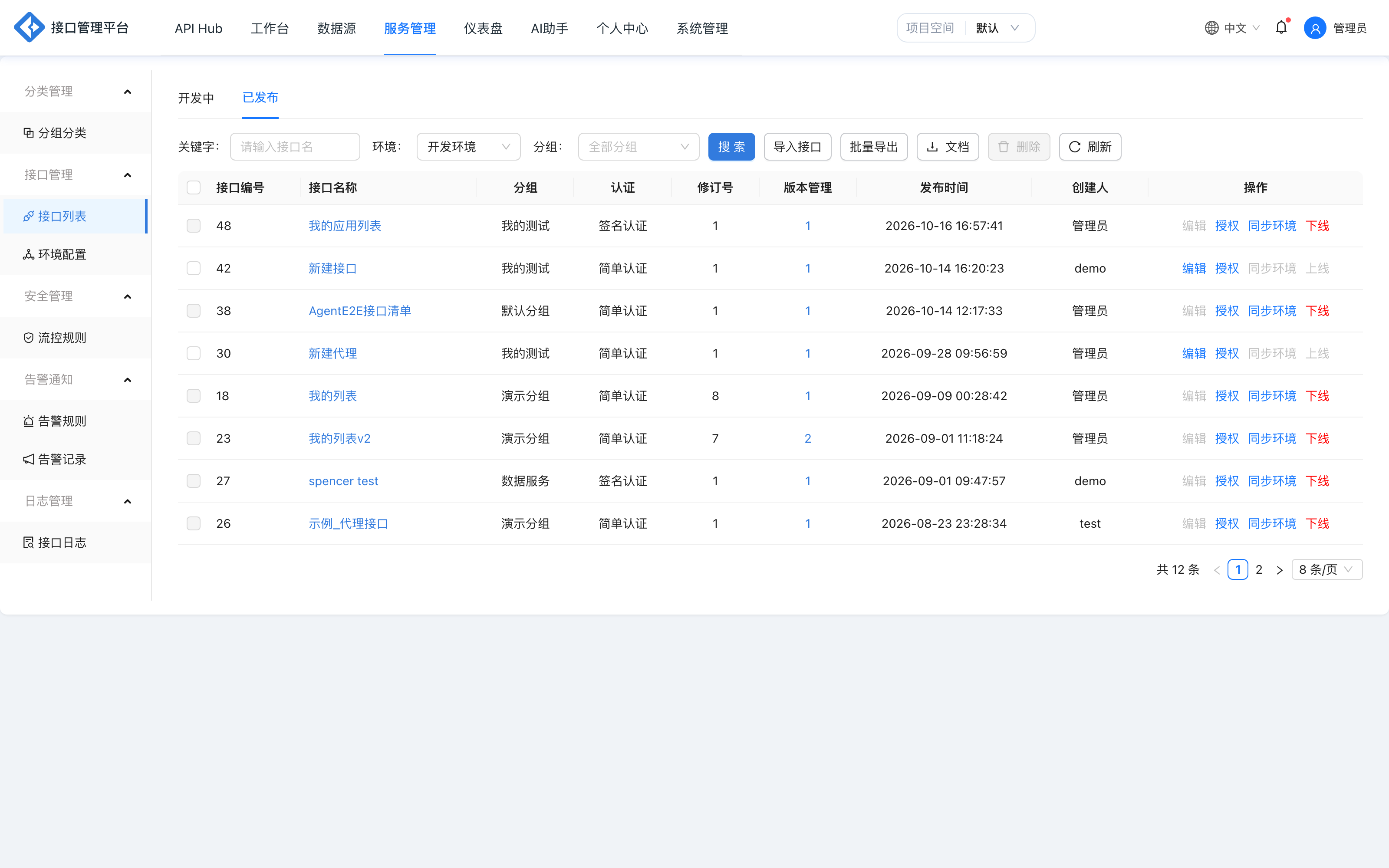
Released
The Released tab shows the snapshot currently effective in each environment (is_current = 1). The same API has one row per environment, so it appears multiple times.
Filters
| Filter | Description |
|---|---|
| Keyword | Search by API name and path |
| Environment | Choose dev, prod or another project environment; the list changes with the environment |
| Group | Filter by the group tree, with search and clear |
List fields
| Field | Description |
|---|---|
| API ID | Source API ID (sourceApiId) |
| API name | Click to open the API details page (with the environment parameter) |
| Group | The group the snapshot belongs to |
| Authentication | The snapshot's authentication method |
| Revision | Revision number of the release snapshot (deployRevision); increments with each release of the same API |
| Version management | API version number; click to open the version management dialog |
| Released at | Snapshot generation time |
| Created by | API creator |
| Actions | Varies by environment; see below |
Development environment (dev) actions
| Action | Description |
|---|---|
| Edit | Available only while offline; opens the workbench to edit the API source |
| Authorize | Select the application credentials allowed to call the API in bulk; project-level credentials cannot be selected |
| Sync environment | Available only while online; syncs a released API to another enabled environment |
| Take online / offline | Toggles the availability of the dev snapshot |
Taking APIs online or offline in the development environment has two extra constraints:
- An API that has never been released or whose snapshot has been destroyed cannot be taken online directly; click "Release" in the workbench first.
- If the API was saved on the development page but not re-released, the list blocks taking it online with the message "There are modification records; click Release to go online again". Re-release before going online to ensure the latest content is running.
Non-development environment actions
| Action | Description |
|---|---|
| History versions | View all release snapshots of the API in this environment and roll back to any historical revision |
| Take online / offline | Toggles the availability of the current snapshot; once offline, callers cannot access it |
Non-development environments cannot be edited directly and cannot roll back to a dev snapshot. Content updates are always synced from dev.
Toolbar capabilities
Authorizing applications
Click "Authorize" on a dev row to select multiple application credentials for the API. The authorization result determines which applications can call the API:
- The list shows application names and AppKeys;
- Project-level credentials (
scope=project) cannot be selected; - Changes take effect immediately after saving, and authorization of a released API propagates to new versions with the release;
- Click "New credential" to go to the application credential management page.
Syncing to other environments
Click "Sync environment" on a dev row to open the sync dialog, which lists target environments row by row:
| Column | Description |
|---|---|
| Environment name | The target environment |
| API version | API version of the environment's current snapshot |
| Revision | Revision number of the environment's current snapshot |
| Last synced at | Generation time of the environment's current snapshot |
| Actions | Sync to this environment |
Before syncing, the platform verifies that the target environment exists and is enabled, the dev snapshot exists, the data source is still accessible and Mock is not enabled on the API. If the target environment already has the same revision, the existing snapshot is returned without generating a new one. See Environments and releases.
Version management
Click the version number in the "Version management" column to open the dialog:
- In dev, it shows all API sources in the version family (draft and released), which can be edited, upgraded, synced to environments, taken online/offline and deleted.
- In non-dev environments, it shows the release snapshots of the same version family, which can be taken online/offline and deleted.
- Deleting a dev version deletes the source API; deleting a non-dev version deletes all snapshots of the API in that environment.
Batch delete
Select multiple rows and click "Delete" to delete them in bulk. Rules:
- Only APIs that are offline in all environments can be deleted;
- If any environment has an online snapshot, the whole batch is rejected with a prompt to take it offline first;
- Deletion cleans up release snapshots, parameters, proxy configuration, rule associations, test cases and runtime cache.
Export Word documentation
Click "Document" to open the export dialog, filter online APIs by the current environment, and export the selected ones as a Word API document. The export comes from release snapshots, not development drafts.
Migration import / export
"Import APIs" and "Bulk export" use ApiGo migration bundles to move APIs between projects or environments. A bundle contains API definitions and, optionally, data sources / groups and categories / test cases, and supports data source mapping. See Versions and migration.
Refresh (administrators)
The "Refresh" button in the top-right corner is visible only to administrators. It manually re-sends API change notifications to trigger resynchronization of runtime details, routes, flow control, degradation, cache and IP rules. Releases and online/offline changes refresh automatically; this button is a reconciliation fallback.
FAQ
| Symptom | Cause | Resolution |
|---|---|---|
| No edit button for a released API | The API is online | Take it offline first, then click Edit |
| The online button is unavailable | The API was saved but not re-released, or was never released | Click Release in the workbench and retry |
| Syncing the environment fails | The target environment is not enabled, the data source is not authorized, or Mock is still on | Work through the dialog errors one by one |
| Batch delete is rejected | An online snapshot exists in at least one environment | Take the API offline in all environments first |
| The document export list is empty | The current environment has no online APIs | Switch environments or take APIs online first |